
Brands building these programs face real constraints. You're competing for attention against dozens of other products, meeting retailer compliance specs, fitting wildly different store footprints, protecting the product itself, and keeping everything consistent whether you're rolling out to 50 stores or 500 dealerships.
This guide walks through display types, design and engineering decisions, production and fulfillment, rollout logistics, and how to measure whether a program actually worked, with a focus on US retail and dealer environments.
Key Takeaways
- Choose a display format based on the product, shopper action, store environment, and rollout scale, not looks alone
- Field-ready programs stay durable, accessible, easy to restock, and consistent across every location
- The right display partner handles concept, engineering, production, kitting, and ongoing support in-house, not just one-off builds
What Are Custom Point of Purchase Displays?
Point-of-purchase (POP) displays are branded fixtures, physical or digital, placed anywhere a shopper browses and decides what to buy. That includes aisle ends, floor space, counters, and showroom areas, not just the register. POP is often confused with POS (point of sale). The distinction matters: POP displays can influence a shopper throughout the entire store visit, while POS displays are concentrated at checkout. POPAI's 2014 mass-merchant study of nearly 3,000 shoppers across three chains found 82% of purchase decisions happened in-store, with 16% of unplanned purchases attributed directly to displays shoppers encountered along the way. Customization means the display is built around:
- Product dimensions, weight, and quantity
- Brand messaging and merchandising goals
- Retailer fixture specs and store footprint
- How shoppers are expected to interact with it Common objectives include:
- Increasing product visibility in a crowded aisle
- Educating shoppers on technical products
- Encouraging trial, sampling, or add-on purchases
- Organizing side-by-side product comparisons
- Reinforcing brand identity at the shelf Custom displays matter most for categories that need explanation or demonstration. Think automotive aftermarket parts, dealer networks, food and beverage sampling, tools and equipment, and building products. A tire doesn't sell itself the way a candy bar does; it needs context, and a generic rack rarely provides it. Chicago Show's work illustrates this range:
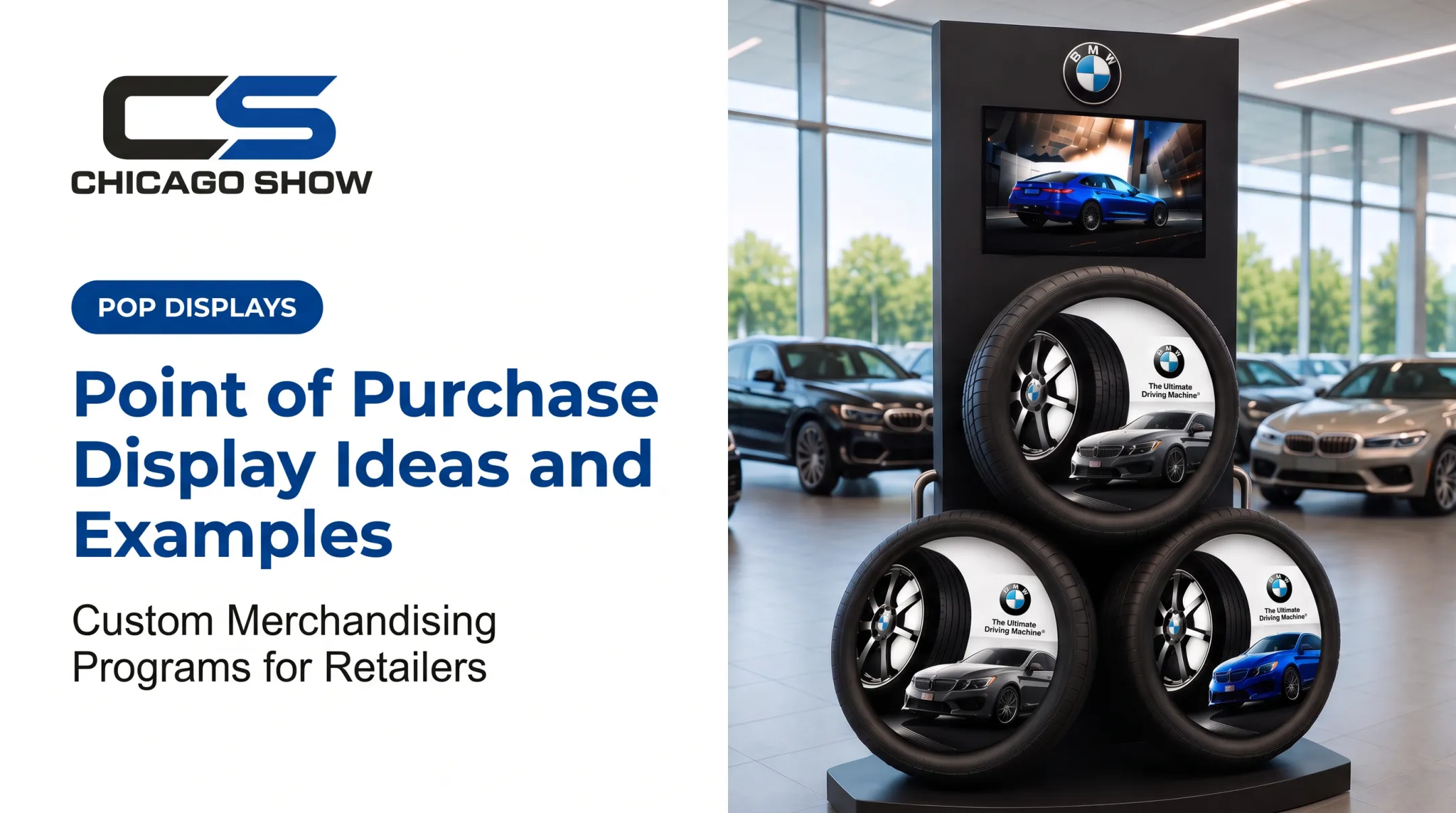
- A freestanding BMW tire display for a dealership showroom presents three tires with branded wheels, vehicle imagery, and a top-mounted video screen
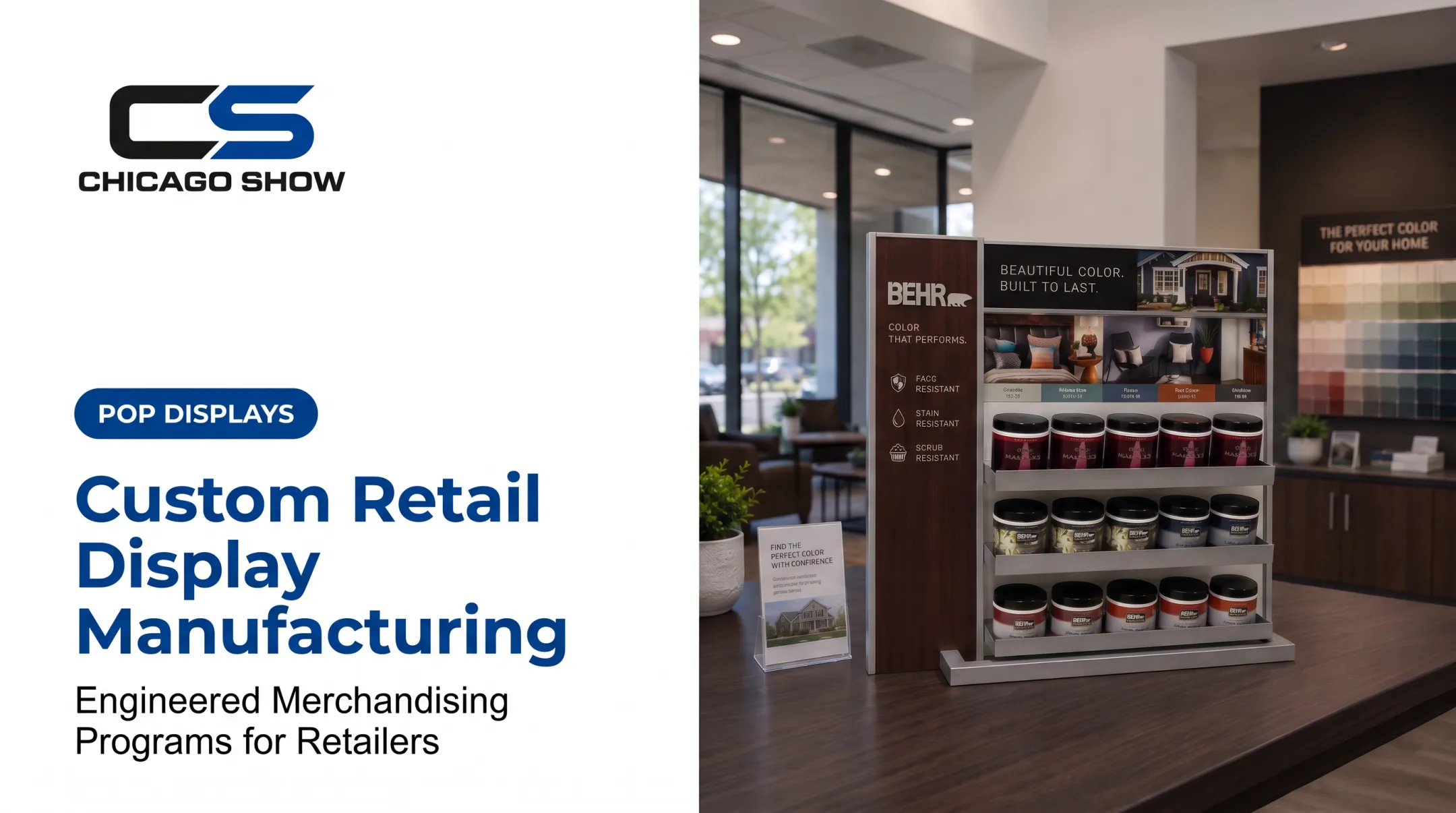
- A Behr countertop sample center lets paint shoppers compare colors against room imagery
- A Lowe's checkout system wraps a cooler with racking for snacks, bottled water, and magazines Same partner, three shopper actions, three different builds.
Which Type of Custom POP Display Is Right for Your Program?
Before picking a format, answer a few questions:
- How big and heavy is the product? A tire display needs structural weight capacity; a golf putter display doesn't.
- How many SKUs are involved? One hero product versus a full comparison line changes the footprint.
- Where will it sit? Showroom floor, service drive, checkout lane, or aisle end.
- Does the shopper need to interact with it? Touch, sample, or just look?
- How long does the campaign run, and how often does it need restocking?
- What does the retailer's planogram or fixture spec require?
Floor, Freestanding, and Showroom Formats
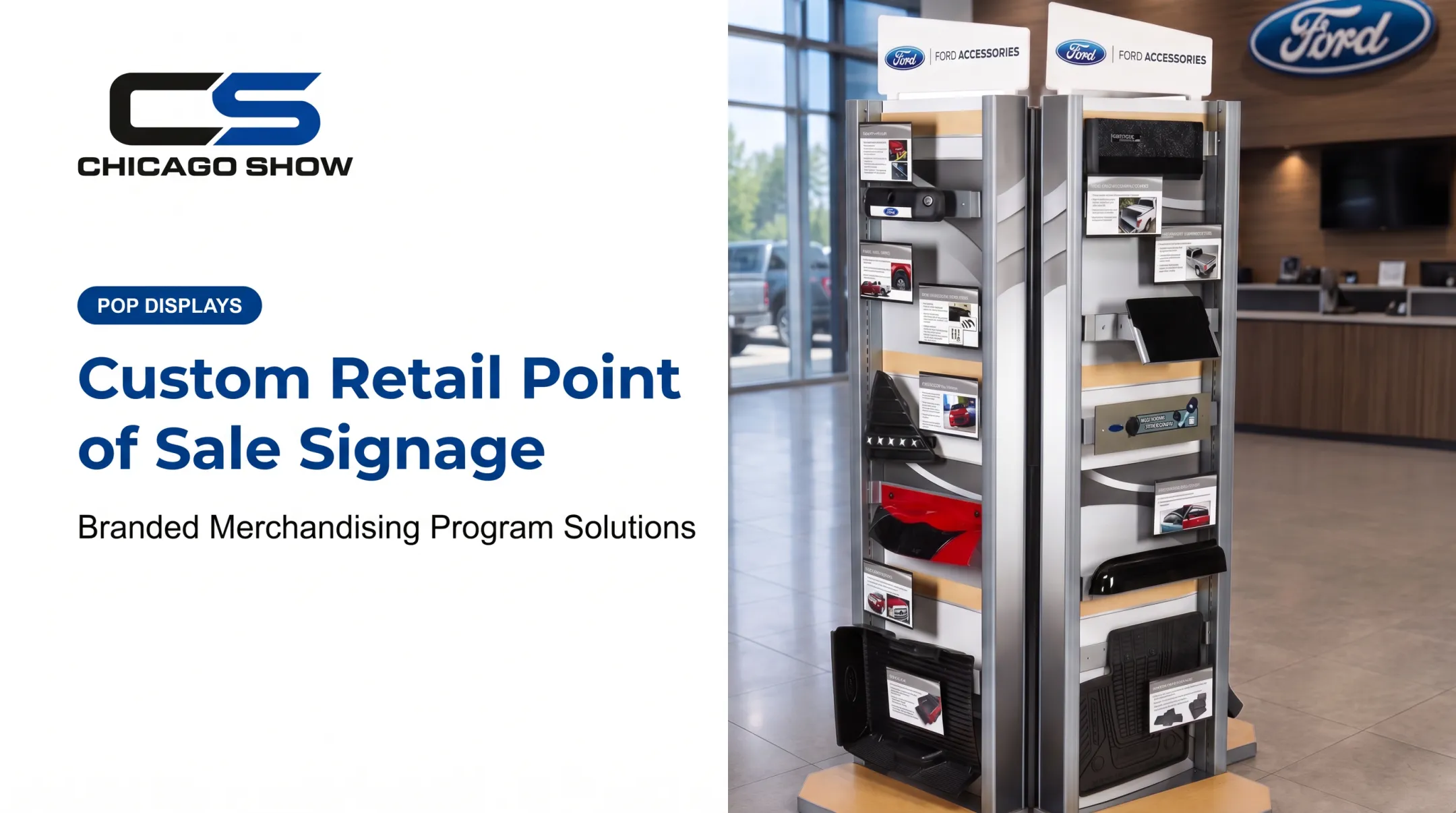
Floor displays, towers, and sidekicks work well for launches, seasonal resets, and showroom placements where a brand needs a standalone presence. Chicago Show's Ford Accessories Showcase is a double-sided showroom tower carrying product information cards.
The Goodyear Rolling Tire Display takes a different approach: a mobile, single-tire merchandiser built for service drives and sidewalks rather than a fixed showroom spot.
Countertop, Shelf, and Checkout Formats
Smaller products, add-ons, and high-volume items tend to fit countertop, shelf, gravity-feed, or dump-bin formats. Chicago Show's Behr Sample Center uses tiered shelves for paint cans and color swatches at counter height.
Checkout racking takes this further. At Lowe's, one build wrapped a Pepsi cooler with shelving for bottled water, snacks, candy, and magazines. One fixture became several merchandising zones at once.
Education and Demonstration Formats
Wall units, comparison boards, and interactive displays suit products that need explanation.
The Monroe Shocks & Struts demo unit uses a clear-covered miniature suspension model with graphics reading "Feel the Difference" and "Reduce Premature Tire Wear." Shoppers get a hands-on reason to understand the part before they buy. Goodyear's Engineered Products display takes a similar tack, mounting real timing-belt components on a diagram board with replacement guidance.
| Format Type | Best Suited For | Example |
|---|---|---|
| Floor/tower/freestanding | Launches, showroom presence, seasonal resets | Ford Accessories Showcase |
| Countertop/shelf | Smaller products, samples, add-ons | Behr Sample Center |
| Checkout/cooler wrap | High-traffic impulse items | Lowe's checkout racking |
| Interactive/demo | Technical products needing explanation | Monroe Shocks & Struts demo unit |
| Mobile/rolling | Service drives, sidewalks, flexible placement | Goodyear Rolling Tire Display |
Temporary, Semi-Permanent, or Permanent?
This decision depends on campaign length, expected handling, and how often you'll refresh graphics, not a fixed lifespan number. A short promotional run favors lighter, less expensive construction. A multi-year dealer program justifies sturdier materials and modular parts that can be refreshed without rebuilding the whole unit.
A quick example: an automotive brand launching a new tire line needs a display that holds real product weight, explains tire specs to a non-expert shopper, and works across hundreds of dealerships with wildly different floor plans. That points toward a freestanding tower with swappable graphic panels, not a tabletop card display.
Design and Engineering Considerations for Custom POP Displays
Good display design starts with the product, not the artwork. Before anything is drawn, lock down the basics:
- SKU dimensions, weight, and quantity
- How products are accessed on the floor
- Whether items stay secured or come off easily for inspection
Brand Expression Within Structural Limits
Color, typography, graphics, and messaging all matter, but they have to work from multiple shopper distances. A headline readable from six feet away needs different sizing than fine print meant for someone standing at the counter.
Shopper Flow and Visibility
Sightlines and physical placement affect whether anyone notices the display at all. A 2021 Journal of Marketing Research eye-tracking study tracking shoppers through grocery aisles found the product level most likely to catch attention sat around 14.7 inches below eye level, roughly chest height.

That's a finding from one studied environment, not a universal rule. Even so, reach height and sightline planning aren't afterthoughts.
Other factors to weigh:
- Aisle clearance and whether the unit blocks traffic
- Complementary product placement nearby
- Locations where shoppers naturally slow down or pause
Materials, Durability, and Testing
Material choice depends on:
- Expected handling and cleaning routines
- Moisture exposure
- Shipping distance
- How the retail environment looks overall
A display headed for a humid convenience-store counter needs different specs than one sitting in a climate-controlled showroom.
Prototypes and structural reviews catch problems before a full production run:
- Stability under load
- How easily staff can restock
- Whether assembly instructions make sense on-site
Chicago Show builds this into the process directly, specifying materials for the display's operating environment before fabrication starts rather than adjusting after the fact.
For multi-location programs, prioritize:
- Modular components that allow regional or seasonal swaps
- Replaceable graphic panels for refreshes without a full rebuild
- Clear assembly instructions for store-level staff
- Pack-out planning built around how the unit ships and sets up
- A path for future reorders without starting design from scratch
From Concept to Retail Floor: The Custom Display Production Process
A custom display program moves through several stages, and skipping any of them tends to show up later as a field problem.
- Brief and site requirements – Lock in product samples, dimensions, target locations, quantities, launch dates, and budget upfront.
- Concept development – Shape initial ideas into something buildable and on budget.
- Design refinement and engineering – Finalize structure, materials, and function together, not separately.
- Prototype and material specification – Choose materials for the real operating environment.
- Production and quality inspection – Check units against approved specs before shipment.
- Packaging, kitting, and delivery – Prepare components and route them to individual locations.

Chicago Show runs that same arc as a five-step execution model tailored to each program:
- Understand the product, environment, and goal
- Review specifications and constraints
- Manage materials and engineering in-house through production
- Track the build through pack-out and shipping
- Support the program after launch with reorders and refreshes
What a Brand Should Bring to the Table
Starting a project goes faster with clear inputs:
- Product samples or accurate dimensions and weight
- Target locations and estimated quantities
- Launch timing
- Brand guidelines and budget parameters
- Any retailer-specific compliance requirements
- The shopper action you want the display to drive
Quality and Fulfillment at Scale
Quality control means confirming the finished unit matches approved specs, checking graphics and finishes, and verifying the product actually fits and remains stable. Chicago Show checks units against specification before shipment rather than waiting for a store complaint to surface a problem.
For multi-location rollouts, kitting and pack-out turn individual components into complete, ready-to-install units headed for dozens or hundreds of locations. Chicago Show handles this through in-house kitting, protective packaging, and fulfillment support, whether that's a single flagship store or a full dealer network rollout.
With more than 124 years in display and merchandising work, Chicago Show has supported programs across retail, CPG, and automotive dealer environments—from concept through delivery, quality oversight, and recurring program support.
If you need a custom display, dealer-network rollout, or recurring merchandising program with one accountable partner, talk with Chicago Show before you lock in a design.
How to Measure Custom POP Display Performance
Define the objective before launch. Visibility, trial, education, add-on sales, and comparison support all call for different success metrics.
Metrics worth tracking:
- Product sales during comparable periods
- Display availability and replenishment frequency
- Shopper interactions (touches, scans, samples taken)
- QR code scans where applicable
- Feedback from retail or dealer staff
When comparing results across test and rollout locations, account for confounding factors: pricing changes, concurrent promotions, inventory gaps, seasonality, and store traffic patterns. A display that "underperformed" in one location might just be sitting behind a stockout.
A 2023 Journal of Retailing field study on endcap projections found purchase rates of 0.7% in a control condition versus 1.3% when sound was added to a moderately vivid display. Results like this are study-specific, not a universal ROI figure you can apply to any program.

Calculate program value using your own project costs against actual commercial outcomes, not a borrowed industry benchmark. What worked for one brand's tire display won't necessarily translate to a paint sample center.
Operational performance matters just as much as sales:
- Damage or missing parts reported from the field
- Setup time and assembly errors at store level
- Compliance with retailer or dealer requirements
- Reorder timing and whether the display still looks right months later
Frequently Asked Questions
What is point of purchase signage?
Signage placed near products or elsewhere in the shopping journey to attract attention, communicate a benefit, or support a promotion. It's a component of a display program, not a full display itself.
What are examples of point of purchase signage and displays?
Common examples include shelf talkers, wobblers, and hanging signs, plus display formats such as end caps, counter units, sidekicks, dump bins, floor fixtures, sample stations, and interactive or digital units.
How much does point of purchase signage cost?
Cost depends on size, quantity, materials, graphics complexity, technology, prototyping, packaging, and rollout scale. Because these variables shift so much by project, a project-specific quote is the only reliable answer.
Where can I buy retail display cases?
Stock cases from retailers or specialty suppliers fit generic, one-off needs. Choose a custom manufacturer when you need branded design, unusual product dimensions, higher durability, or consistent units across many locations.
How should I display products for sale?
Prioritize accessibility, clear messaging, logical grouping, and sightlines that match normal shopper traffic. Test the display in a real store environment before committing to a full rollout.
What are the main types of point of purchase displays?
Most programs use countertop or inline units, floor and endcap fixtures, pallet or bin displays, wall-mounted units, and temporary or permanent builds—plus digital or interactive formats when demonstration matters. Match the format to the product and store environment, not the other way around.