
Effective point-of-sale displays do more than decorate a store. They attract attention, communicate a reason to buy, simplify product choice, and prompt action before the shopper moves on.
This guide covers display types, creative concepts, 2026 trends, design principles, and how to plan a display program that actually performs in the field.
Key Takeaways
- Match display format and placement to the shopper's mindset: browsing, comparing, testing, or paying.
- Prioritize one message, a strong focal point, easy access, and instantly recognizable branding.
- Choose modular, durable, refreshable designs for multi-store or multi-wave rollouts.
- Track engagement and product movement, not just how the display looks on day one.
What Are the Main Types of Point of Sale Displays?
The terms "POS" and "POP" get used interchangeably, but they aren't quite the same thing. POS displays sit at or near checkout. POP (point of purchase) is the broader category covering every display placed anywhere a shopper might decide to buy, including aisles, endcaps, and windows (Shopify). A checkout counter unit can be both.
Display types by location and purpose
Counter and checkout formats work best for compact, impulse-driven items:
- Countertop displays for small accessories or add-ons
- PDQ (Pretty Darn Quick) displays that move straight from shipment box to shelf
- Gravity-feed displays that advance product automatically as it sells
- Baskets and checkout racks for last-minute grabs
Chicago Show's checkout racking program for Lowe's wraps a beverage cooler with racks for snacks, candy, bottled water, and magazines, turning one fixture into several impulse categories at once. A Dunlop Motorcycle Tires counter display pairs a molded cut-tire section with rebate messaging of up to $40, giving shoppers a clear reason to pause and consider the add-on.
Shelf-based formats create separation on a crowded set without rebuilding the aisle:
- Shelf talkers for price, promo, or benefit callouts at eye level
- Aisle fins that project into the walkway to catch peripheral attention
- Sidekicks that hang off the shelf edge for add-on product
Larger and experiential formats
Larger formats can dominate a sightline, so each one needs a clear job in the store:
- Floor displays and endcaps for high-volume promotions
- Dump bins for clearance or bulk impulse items
- Sampling and demonstration stations for hands-on trial
- Window displays for storefront discovery
- Digital or interactive units for product education
Chicago Show's rolling tire display is a mobile, single-tire merchandiser built for service drives and sidewalks. It shows how a floor format can move with the shopper instead of waiting for them.
Creative Point of Sale Display Ideas and Examples
Hero-product display that makes shoppers stop and look
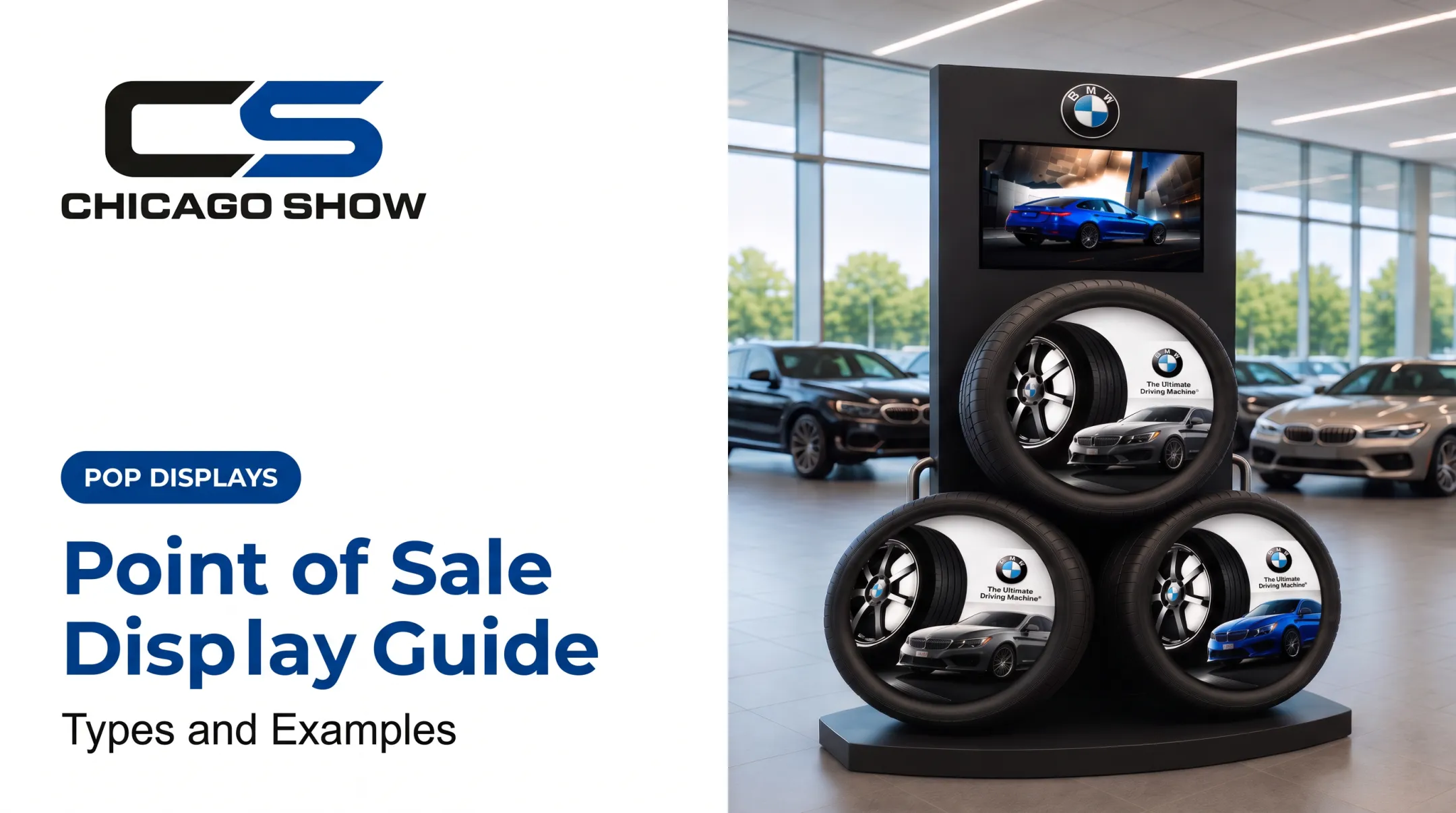
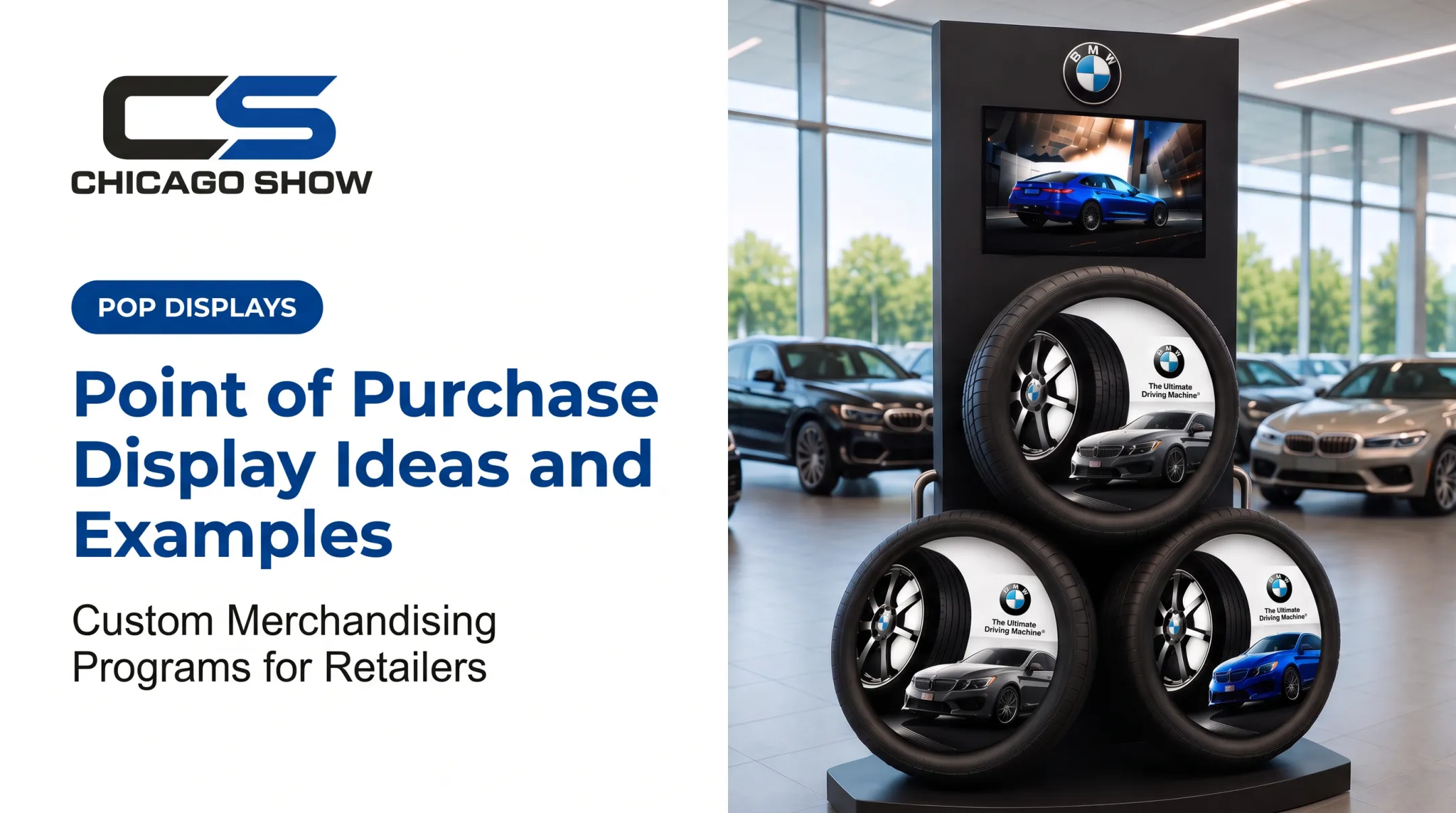
A hero display builds around one product or benefit using scale, contrast, or an unexpected structure. Chicago Show's BMW tire display uses three oversized tires mounted on a branded tower with vehicle imagery and a center-mounted screen showing a blue car in motion.

The concept reads clearly from across a dealership showroom floor. That clarity matters: if shoppers can't understand the message from their actual approach path, the display has already failed.
Themed or occasion-based merchandising
Grouping products around a use case, not a category, gives shoppers an instant answer to "why would I need this?"
A paint retailer might pair Behr color swatches with room imagery and tiered sample shelves, turning a weekend project into a merchandising moment rather than a shelf of cans.
STIHL's branded fixture, an engraved wood seat on a steel frame, works the same way for an outdoor-equipment department: it signals a lifestyle, not just a product line.
Demonstration, sampling, and compare-and-choose experiences
Letting shoppers touch, test, or compare builds confidence fast. Chicago Show's Goodyear Engineered Products display shows a real timing-belt system, including cam gears, an idler pulley, and a tensioner, with a panel recommending replacement every 60,000 to 100,000 miles. Shoppers see exactly what they're buying before they buy it.
The Monroe Shocks & Struts interactive demo unit takes a different approach: it lets shoppers physically feel the difference between worn and new components, backed by a 1,000-mile, 90-day risk-free trial message. Any demo station still needs a plan for restocking, cleaning, and staff coverage, especially for food or beverage sampling.
Modular and refreshable displays
A display built for one launch often needs to survive several. Chicago Show's Tire Display Program uses modular, branded counter-mounted and rolling units for showroom floors and service drives, with interchangeable panels so the same structure supports a new campaign without a full rebuild.
Counter and countertop merchandisers follow the same logic:
- Tiered shelving for dense product assortment
- Customizable graphics for campaign swaps
- Branded panels that change as SKUs rotate
Sensory and tactile details that extend engagement
Texture and tactile detail extend engagement past the first glance. The Monroe shop stool, with a tire-shaped seat and shock-absorber-style legs, turns a service-area seating piece into a branded touchpoint. Behr's color swatches invite physical handling rather than passive viewing. These details don't need to be flashy. They just need to give shoppers a reason to linger a few extra seconds.
Key Retail Display Trends for 2026
Digital and connected experiences
Screens and QR codes show up more often as additions to physical displays, not replacements for them. A September 2026 trade gallery from P2PI described an interactive touchscreen built into a Sony tabletop fixture at Best Buy (P2PI). Chicago Show's BMW tire display follows the same approach with its center-mounted screen: the physical product still does the selling, and the screen adds context.
Durable, reusable, and lower-waste display programs
Retailers increasingly favor fixtures that can be refreshed instead of replaced. Chicago Show specifies materials based on where a display will actually live—retail floor or dealer showroom—before production begins. Modular programs make that model practical:
- Swap graphics panels on units like the Tire Display Program instead of rebuilding the structure for every push
- Match materials to the environment the fixture will face in the field
- Keep sustainability claims specific, with defined materials or recyclability—not vague "eco-friendly" language
Adaptive merchandising across store formats
Displays need to work across different store footprints, not just one flagship layout. Chicago Show's planning process accounts for sizes, quantities, retail environments, and rollout timing before a concept is finalized, so one design stays workable across dozens of store formats. Focus on trends that solve a shopper problem in your specific retail environment rather than chasing every new idea.
Design Principles That Make Creative POS Displays Work
Start with the shopper, location, and objective
Before sketching anything, define the target shopper, the purchase stage, the featured product, and the desired action. A checkout display, a showroom tower, and a service-drive unit each impose different constraints on size, copy length, and product access. Skipping this step is the fastest way to end up with a display that looks good in a rendering and fails on the floor.
Build a clear visual hierarchy
Direct the eye in a deliberate order: brand → hero product → supporting proof → offer → action. Chicago Show's Monroe demo unit does this with bold, short phrases like "Feel the Difference" and "Shorten Stopping Distance," stacked instead of crowded together. Keep copy concise. Use contrast and negative space so shoppers can scan it in a glance, not read it like a brochure.

Design for real-world use
A great concept still has to survive shipping, assembly, and months of daily handling. That means checking:
- Structural stability and load capacity
- Cleanability and tamper resistance
- Ease of replenishment for store staff
- Transport durability and assembly time
Chicago Show's custom checkout racks are built to fit existing store layouts rather than requiring retailers to rearrange their floor plan, so teams avoid a common rollout headache.
Make the display feel unmistakably on-brand
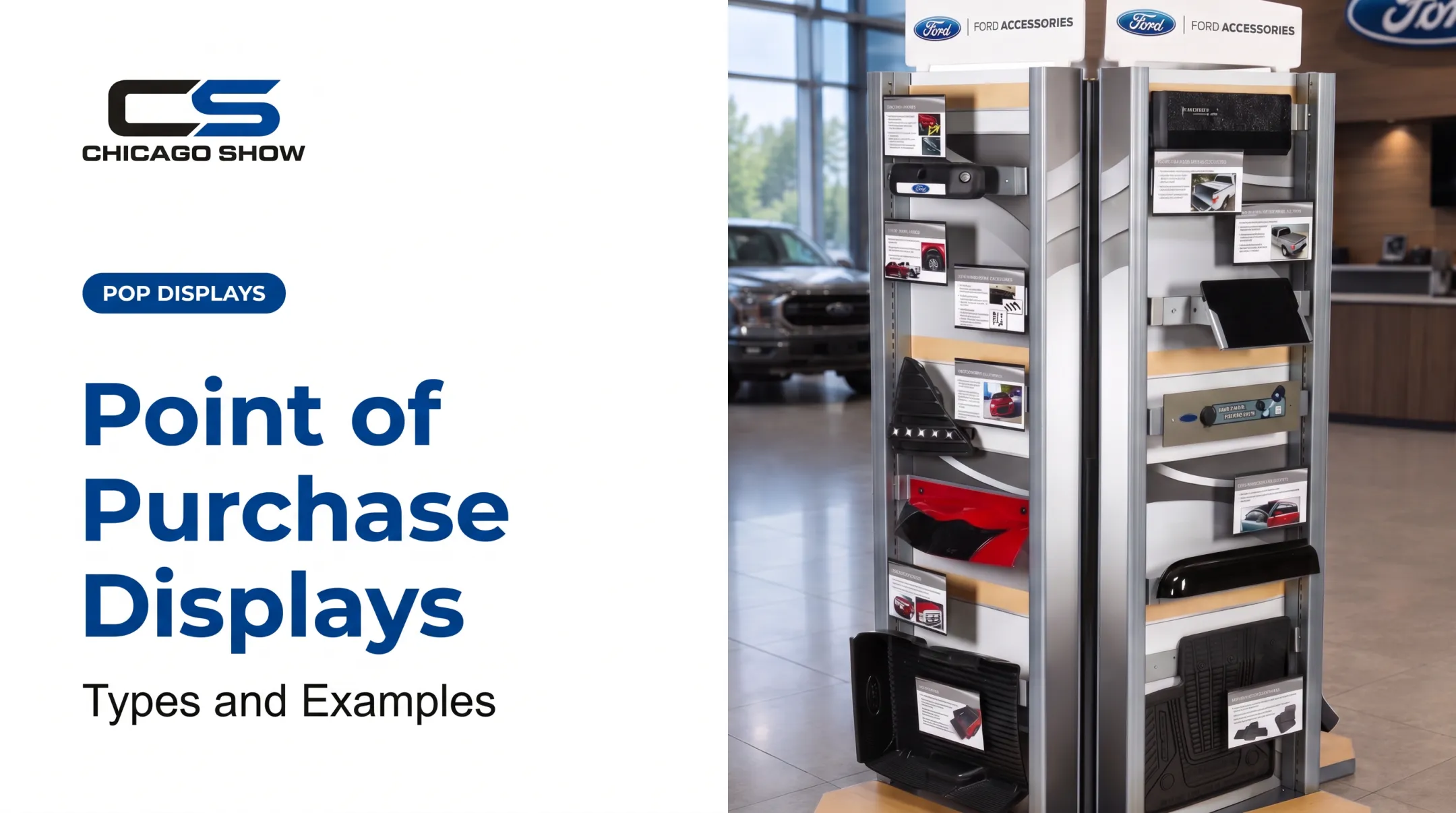
Consistent colors, typography, and materials matter, but a branded display should help shoppers understand the product faster, not compete with it through excess decoration. Chicago Show's Accessories Showcase—a double-sided Ford tower—pairs physical samples with individual product-information cards. Branding stays present without burying the product.
Test, refine, and document the concept
Review prototypes from shopper eye level, from a distance, and from the angle shoppers will actually approach. Check legibility, reach, and replenishment access before signing off on production. Brands without an internal display team can hand the full path—concept, in-house engineering, production, checks, and fulfillment—to a partner like Chicago Show, so the unit still looks right once it hits the floor.
How to Plan, Measure, and Scale a POS Display Program
Plan around the full program, not just the unit
A display that looks great in a concept image can still fail if it arrives damaged, can't be assembled easily, or doesn't fit the store. Plan past the design file and cover the full program:
- Quantities and store types
- Rollout waves and replenishment
- Packaging and shipping destinations
Chicago Show handles kitting, protective pack-out, inventory storage, and shipment to individual locations as part of this process.
Choose materials and formats according to use
| Approach | Best for | Trade-off |
|---|---|---|
| Temporary | Short campaigns, seasonal pushes | Lower cost, shorter lifespan |
| Semi-permanent | Quarterly resets, multi-month promotions | Balance of durability and flexibility |
| Permanent | Showrooms, dealer networks, year-round programs | Higher upfront cost, longer field life |
Materials should match the environment, not just the design brief. A display headed for a retail floor needs different specifications than one built for a CPG checkout counter or an automotive service bay.
Measure performance and field execution
A 2015 POPAI/Quri compliance study of over 5,000 in-store observations found that only about half of audited stores had planned secondary displays properly executed. Properly executed displays delivered an average of $3.18 in incremental sales for every $1 spent (POPAI/Quri, 2015). A display that isn't installed correctly can't deliver the results it was designed for.

Track metrics that match your objective:
- Product movement and attachment sales
- Display compliance and placement accuracy
- Replenishment frequency
- Staff feedback and photo audits
Compare before-and-after results where possible, and avoid claiming a display caused a lift without a real comparison point.
Scale what works and refresh what does not
Once a concept proves itself, lock in a repeatable system:
- Documented assembly instructions
- Reorder specifications
- Quality checks that travel with the design to every location
Chicago Show's recurring program support keeps specifications and program history across years, so a reorder or refresh doesn't mean starting from scratch.
Work the loop in order: define one shopper problem, build the display around the action you want, test it in the field, then scale what works and refresh what does not.
Frequently Asked Questions
What are the key retail display trends for 2026?
Expect more digital elements built into physical fixtures, durable reusable materials, and adaptable formats that work across different store sizes. Accessibility needs and performance data also shape how displays get designed and refreshed.
What are some examples of point-of-sale displays?
Common POS examples include:
- Counter displays and PDQ units
- Gravity-feed displays and shelf talkers
- Checkout baskets and floor stands
- Sampling stations and digital displays
- Branded demo units, such as interactive tire or component showcases
What are the 5 types of displays with examples?
Counter displays (countertop merchandisers), shelf displays (shelf talkers), floor or endcap displays (freestanding towers), temporary or seasonal displays (holiday dump bins), and interactive or digital displays (touchscreen-equipped fixtures).
What is the difference between a POS and a POP display?
POS refers to displays positioned at or near checkout. POP is the broader category covering any display placed where shoppers make purchase decisions, including aisles and endcaps, so checkout units often qualify as both.
How do I choose the right POS display for my product?
Match the fixture to product size, shopper goal, store location, campaign length, and retailer requirements. Also weigh budget, restocking needs, and whether shoppers must touch, test, or compare before they buy.
How can I measure whether a POS display is working?
Track metrics tied to your goal, such as product movement, add-on sales, display compliance, and replenishment frequency. Pair sales data with staff feedback and photo audits, then compare results against a baseline.